Set up a guest automation
For: StaffOrg admin
Last reviewed:
TL;DR
Open Communications → Automations, choose the draft whose description mentions follow-up after a guest’s first attendance, review the task, save, test, and activate.
Steps
- Open Communications → Automations (
/admin-church/workflows). - Open the draft whose description says a guest’s first attendance creates a task for the pastoral team. Do not rely on its name: Canton GA is a local name used by the church in the screenshot.
- In Builder, confirm the When attendance is recorded trigger. If no conditions appear, the flow runs whenever the trigger fires; review its scope before continuing.
- Under Create task, confirm the
follow_uptype, Dar seguimiento a la asistencia title, Contactar al miembro tras su participación. notes, and a due date of 2 days. - Select Save and test the flow with test data according to your church’s process.
- After confirming that the task is created with the correct scope and details, select Activate. Do not select Subscribe now as part of this procedure.
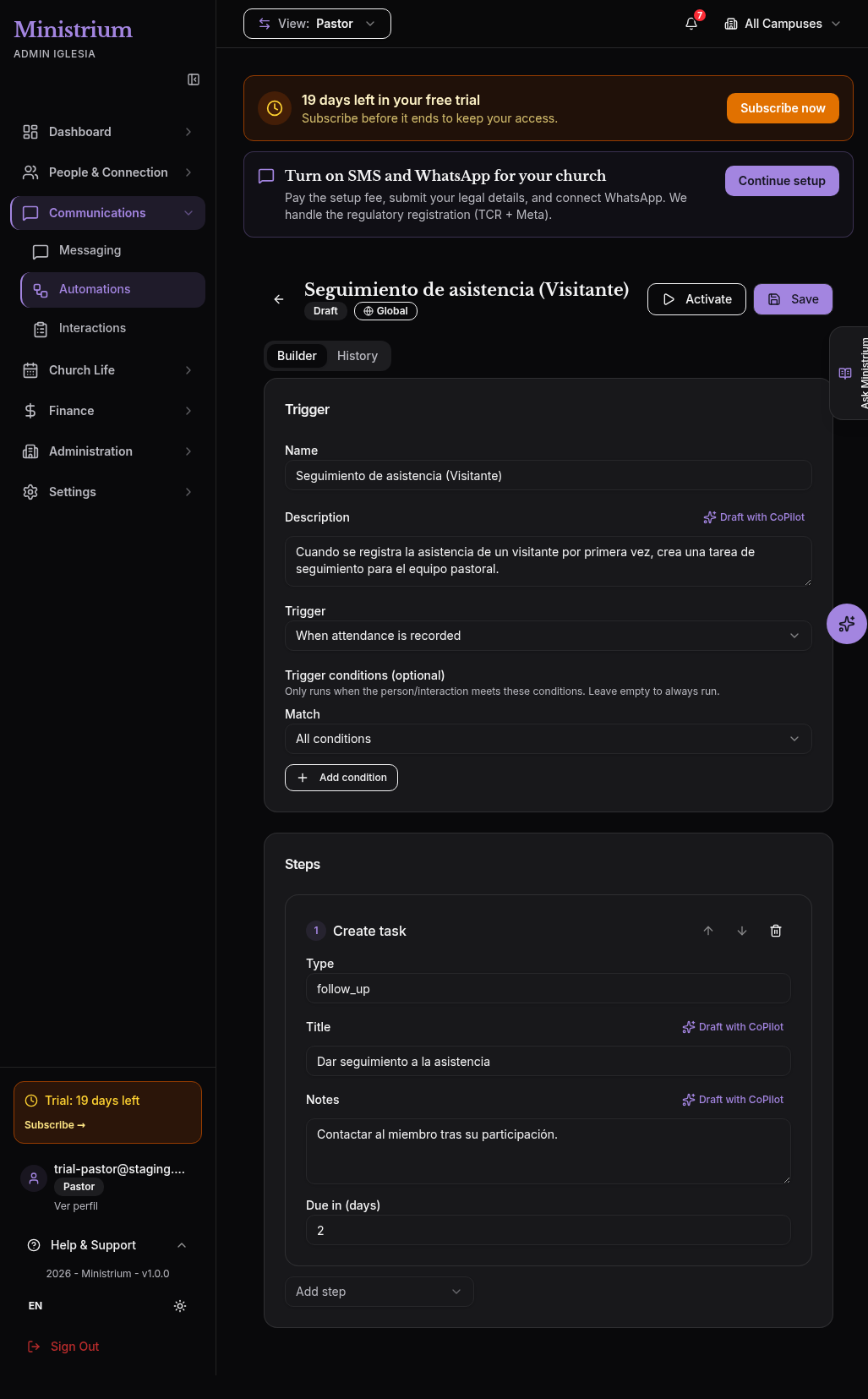
The screenshot shows the real editor. The orange banner is for the trial, and the purple bar is for SMS and WhatsApp onboarding; neither configures this automation.
Was this helpful?id:
set-up-visitor-automationLast updated on