Configure your first campus
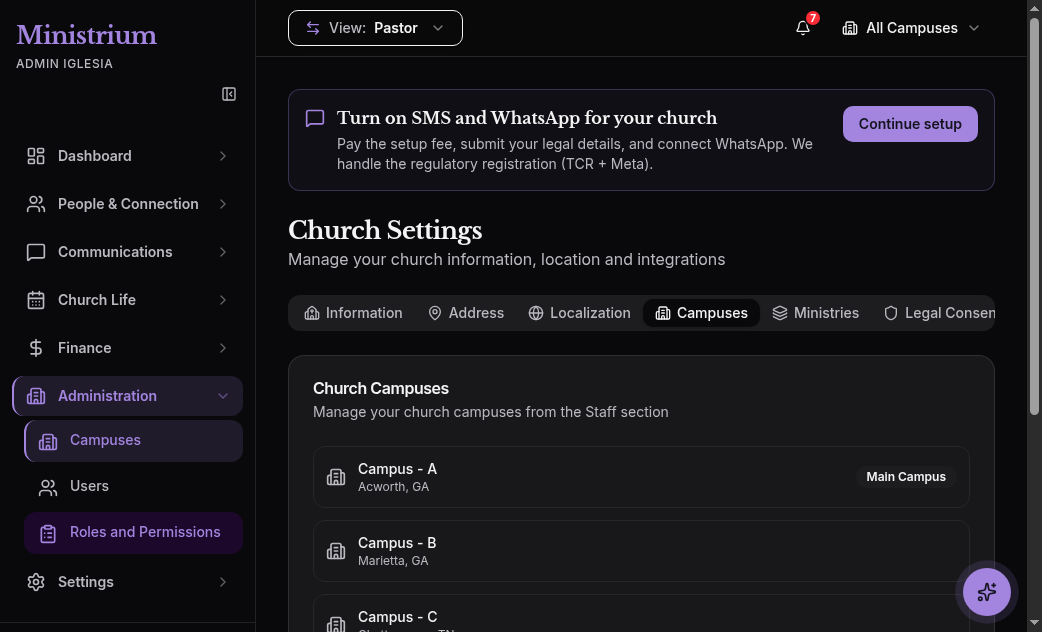
Every church on Ministrium has at least one campus. The campus is the physical location where your church operates: attendance is counted per campus, donations are associated with a campus, local leaders are restricted to their campus. Even if your church has only one location, the campus model exists so that the day you open a second one, nothing has to be migrated.
Steps
Open the Campuses module
In the side menu, open Church → Campuses. You’ll see the empty list and the Create campus button.
Fill in the campus data
- Campus name: short and recognizable. Examples: Main Campus, North Campus, Downtown. It appears in reports, member lists, and on the public donation page.
- Address: full physical address. It’s printed on tax-deductible receipts and used for directions sent to visitors who register online.
- City, country, and time zone: if they differ from the church’s main location.
- Estimated capacity: number of people the venue holds. Used for capacity alerts in events.
Define the kiosk PIN
The kiosk PIN is a 4-digit code entered on the check-in tablet to enter operation mode. Without the PIN nobody can query sensitive data from the tablet, even if it’s left unlocked.
- Use a different PIN than your credit card.
- Share it only with the team that operates the kiosk (typically the secretary and welcome volunteers).
- You can change it any time from Church → Campuses → Edit.
Mark as primary campus
Activate the Set as primary campus checkbox. The primary campus is the one assigned by default when:
- Someone registers as a visitor on the public page.
- A new member is created without specifying a campus.
- A donation arrives via QR without an explicit campus.
Only one campus can be primary at a time. If you later mark another as primary, the previous one loses the mark automatically.
Save
Click Create campus. The campus becomes active and appears in the list. The action is logged in the audit.
What is configured per campus
Once the campus is created, several aspects of operation are configured at its level rather than the church level:
- Local campus team: campus pastor, local secretary, ministry leaders who only operate at that campus.
- Events and services: every regular service and every event is associated with a campus.
- Attendance: figures are counted per campus and aggregated at the church level.
- Donations: donations are associated with the campus the donor chose, or the primary by default.
- Communications: dynamic lists can be filtered by campus.
When you add a second campus
The day you open a second campus, simply return to Church → Campuses → Create campus. What changes:
- Executive reports start showing campus comparisons (attendance, donations, growth).
- The supervisor roles begin to make sense, providing visibility across multiple campuses at once.
- Multi-campus is native: there is no per-campus surcharge on standard plans. See Plans & Billing.
For advanced operational details (transfers between campuses, consolidated reports, regional hierarchies) see Multi-Campus.
Next steps
- Invite the team and assign roles — add the campus pastor and local secretary.
- Activate the check-in kiosk — put the tablet at the entrance with the PIN you just defined.
- Multi-Campus — when you’re ready to grow.